

Automated Email Replies Based on Intent & Urgency Detection: The Complete Guide for n8n Workflow Automation
In today’s fast-paced business environment, email overload has become one of the biggest productivity killers for organizations worldwide. The average knowledge worker spends 28% of their workweek managing email, yet many critical messages still slip through the cracks or receive delayed responses. What if there was a way to automatically understand not just what your customers are saying, but how urgently they need help and what they actually want? Automated email replies based on intent & urgency detection represents a revolutionary approach to email management that combines artificial intelligence with workflow automation to create smarter, more responsive communication systems.
Key Takeaways
• AI-powered email systems can reduce response times by up to 12 hours by automatically identifying content type and priority levels
• Intent recognition technology distinguishes between support requests, pricing inquiries, and feature questions to trigger targeted responses
• Sentiment analysis capabilities detect customer emotional states and urgency levels to ensure appropriate response prioritization
• n8n workflow automation serves as the perfect orchestrator for connecting AI models with existing business tools
• Smart classification systems use natural language processing to understand meaning and tone beyond simple keyword filtering
Understanding Automated Email Replies Based on Intent & Urgency Detection
What Makes Intent & Urgency Detection Revolutionary
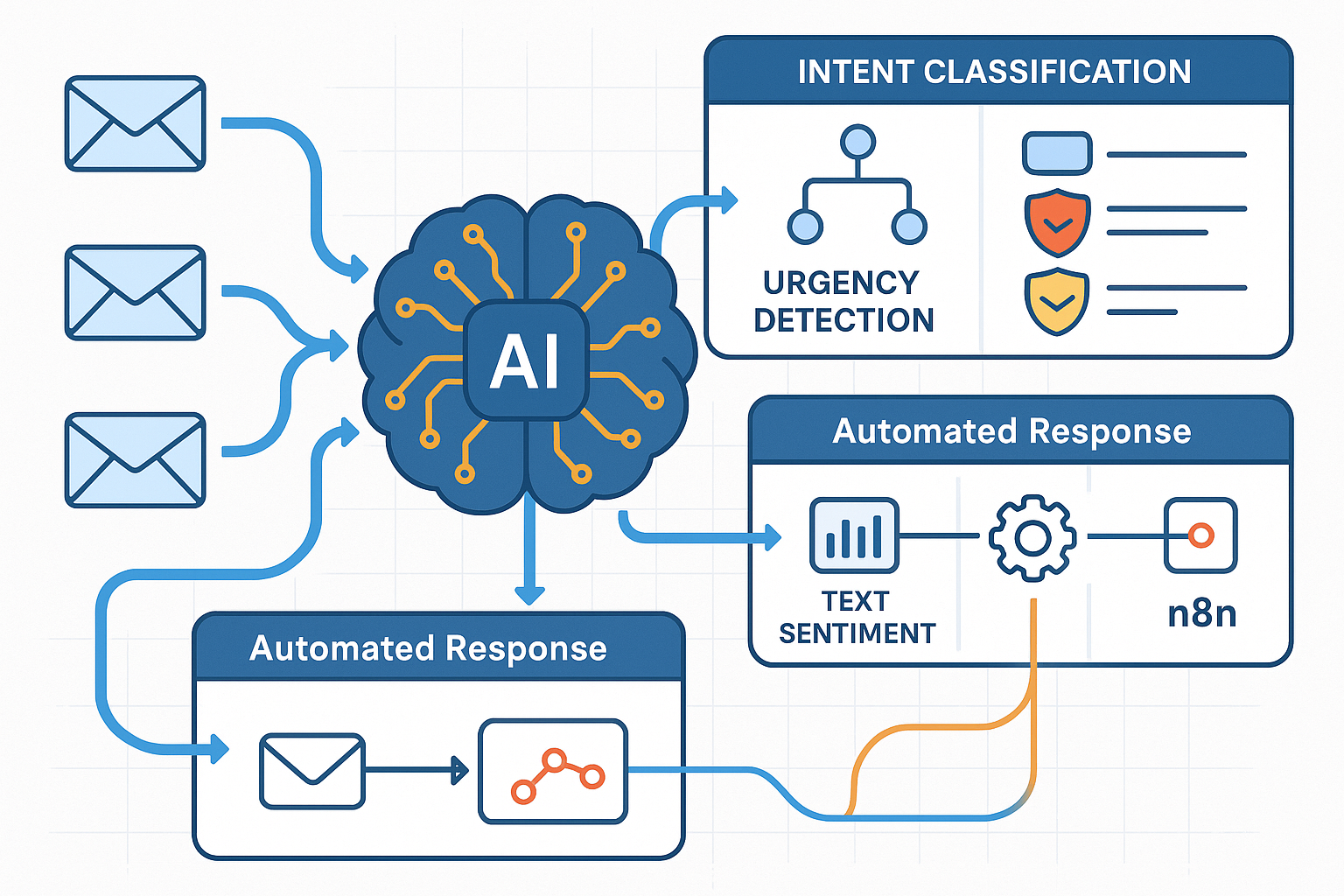
Traditional email filters rely on basic keyword matching and sender information to categorize messages. However, automated email replies based on intent & urgency detection goes far beyond these limitations by leveraging advanced natural language processing (NLP) and machine learning algorithms to understand the true meaning and priority level of incoming communications.
Intent recognition technology in AI autoresponders automatically distinguishes whether incoming customers are asking for support, pricing information, or product features, enabling targeted automated responses [1]. This sophisticated understanding allows businesses to:
- Route messages intelligently to the right departments or team members
- Prioritize urgent requests that require immediate human attention
- Generate contextually appropriate automated responses
- Reduce response times while maintaining quality customer service
The Science Behind Smart Email Classification
Modern AI systems use several advanced techniques to analyze incoming emails:
🧠 Natural Language Processing (NLP): Analyzes the structure, grammar, and semantic meaning of email content to understand context beyond individual keywords.
📊 Sentiment Analysis: Detects customer emotional states including frustration (‘I’m sick of waiting’), urgency (‘I need help now’), and positivity (‘Love this product!’) to trigger appropriate response prioritization [2].
🎯 Intent Classification: Uses machine learning models trained on millions of email examples to categorize messages into specific intent categories like support requests, sales inquiries, or general information.
⚡ Urgency Scoring: Analyzes language patterns, keywords, and context clues to assign priority scores that determine how quickly a message should be addressed.
Building Automated Email Replies Based on Intent & Urgency Detection with n8n
Why n8n is Perfect for Email Automation
n8n serves as the ideal orchestrator for implementing automated email replies based on intent & urgency detection because it seamlessly connects AI capabilities with existing business tools. Unlike standalone AI chatbots or simple autoresponders, n8n allows you to build comprehensive workflows that:
| Feature | Traditional Autoresponders | n8n AI Workflows |
|---|---|---|
| Intelligence Level | Keyword-based rules | AI-powered intent detection |
| Integration Capability | Limited to email | Connects 400+ tools |
| Customization | Template-based | Fully programmable |
| Scalability | Fixed functionality | Infinitely expandable |
| Learning Ability | Static responses | Continuous improvement |
Core Components of an AI Email Workflow
1. Trigger Setup
Your automated email workflow begins with triggers that monitor incoming messages across multiple channels:
- Email received (Gmail, Outlook, IMAP)
- Contact form submissions from your website
- Support ticket creation in helpdesk systems
- Social media messages from integrated platforms
2. AI Processing Pipeline
Once triggered, emails flow through sophisticated AI analysis:
Incoming Email → Intent Classification → Urgency Detection → Response Generation → Action Routing
3. Smart Response Generation
Based on the detected intent and urgency level, the system can:
- Generate personalized responses using AI language models
- Route high-priority messages to human agents immediately
- Create follow-up tasks in project management tools
- Update customer records in CRM systems automatically
Implementing Intent Detection in n8n
Step 1: Email Ingestion and Preprocessing
Start by setting up email triggers that capture incoming messages and extract key information:
- Subject line analysis for quick intent hints
- Sender information for customer context
- Email body content for detailed analysis
- Attachment detection for document-based requests
Step 2: AI-Powered Intent Classification
Use n8n’s AI nodes to connect with language models like OpenAI GPT-4 or Anthropic Claude:
// Example intent classification prompt
const classificationPrompt = `
Analyze this email and classify the primary intent:
- SUPPORT: Technical issues, problems, complaints
- SALES: Pricing, purchasing, product information
- GENERAL: Questions, feedback, general inquiries
- URGENT: Emergency situations, critical issues

Email: "${emailContent}"
Respond with just the category and confidence score.
`;
Step 3: Urgency Level Assessment
Implement urgency detection using multiple signals:
🔴 High Urgency Indicators:
- Words like “urgent,” “emergency,” “ASAP,” “immediately”
- Negative sentiment with time pressure
- System outage or service disruption mentions
- Escalation language from frustrated customers
🟡 Medium Urgency Indicators:
- Business hour requests for standard support
- Sales inquiries with specific timelines
- Follow-up messages on existing issues
🟢 Low Urgency Indicators:
- General information requests
- Positive feedback or testimonials
- Newsletter subscriptions or unsubscribes
Advanced Features and Optimization Strategies
Context-Aware Response Generation
Automated email replies based on intent & urgency detection becomes truly powerful when responses consider the full context of customer interactions. Advanced systems implement:
📚 Historical Context Analysis: Reviews previous email exchanges to understand ongoing issues and avoid repetitive responses.
🎭 Tone Matching: Adapts response tone to match customer communication style – formal for business inquiries, casual for general questions.
🔍 Sarcasm and Nuance Detection: Context awareness algorithms recognize nuanced language patterns such as detecting sarcasm (interpreting ‘That’s just great’ as negative rather than positive) to ensure appropriate automated response selection [3].
Semantic Intent Clustering
Modern AI systems go beyond simple categorization by using semantic intent clustering to automatically group similar requests:
“Semantic intent clustering automatically categorizes response messages into meaningful clusters representing different intents (thank you, apologies, unable to attend) from a training corpus of 238 million email messages” [4]
This advanced technique allows your n8n workflows to:
- Identify emerging patterns in customer requests
- Automatically create new response templates for common scenarios
- Improve classification accuracy over time through machine learning
- Detect seasonal trends in customer communication
Behavioral Trigger Integration
Behavior-based trigger systems enhance email automation by connecting customer actions with appropriate responses:
🛒 E-commerce Triggers:
- Cart abandonment reminders sent within 2 hours of checkout abandonment
- Product recommendation emails based on browsing history
- Restock notifications for previously viewed items
📈 Engagement Triggers:
- Follow-up sequences for downloaded resources
- Webinar invitations based on content consumption
- Upgrade prompts for active free trial users
🎯 Sales Triggers:
- Immediate responses to pricing page visits
- Demo scheduling for high-value prospect actions
- Personalized proposals for qualified leads
Predictive Response Optimization
Predictive analysis examines historical buying patterns and engagement data to determine optimal timing for email sends, adjusting frequency based on click-through rates to prevent customer unsubscription [5]. In n8n workflows, this translates to:
⏰ Timing Optimization:
- Send sales emails when prospects are most likely to engage
- Schedule follow-ups based on individual response patterns
- Avoid email fatigue by respecting customer preferences
📊 Performance Monitoring:
- Track response rates for different intent categories
- Measure customer satisfaction with automated responses
- Identify opportunities for workflow improvements
Real-World Implementation Examples
Customer Support Automation
High-urgency customer issues identified by AI systems immediately route to dedicated support queues, while sales inquiries trigger personalized auto-replies and internal newsletters automatically file into ‘read later’ folders [6].
Example Workflow: Technical Support Triage
- Email Analysis: AI examines support request for technical keywords, error messages, and urgency indicators
- Severity Classification: System assigns priority levels (P1-Critical, P2-High, P3-Medium, P4-Low)
- Automated Response: Sends immediate acknowledgment with estimated response time
- Routing Decision: Critical issues go directly to senior technicians, routine questions get knowledge base articles
- Follow-up Scheduling: Creates reminder tasks for human agents to check on resolution progress
Sales Inquiry Management
Smart Reply systems like Google’s AI deployed in Gmail assist with 10% of email replies, using long short-term memory networks (LSTMs) to predict sequences of text and suggest context-aware responses [7].
Example Workflow: Lead Qualification
Incoming Sales Email → Intent Detection → Lead Scoring → CRM Update → Personalized Response → Sales Team Notification
Key Features:
- Automatic lead scoring based on company size, budget indicators, and timeline mentions
- Personalized response generation using customer’s industry and specific pain points
- CRM integration to create or update lead records automatically
- Sales team alerts for high-value prospects requiring immediate attention
Content Marketing Automation
AI systems automatically generate trigger-based actions that nudge customers at the moment they show interest in products, such as clicking advertisements or visiting product pages [8].
Example Workflow: Content Engagement Response
- Blog comment notifications trigger personalized thank-you emails with related content suggestions
- Resource download confirmations include next-step recommendations based on content topic
- Newsletter engagement tracking identifies highly engaged subscribers for special offers
Measuring Success and Continuous Improvement
Key Performance Indicators (KPIs)
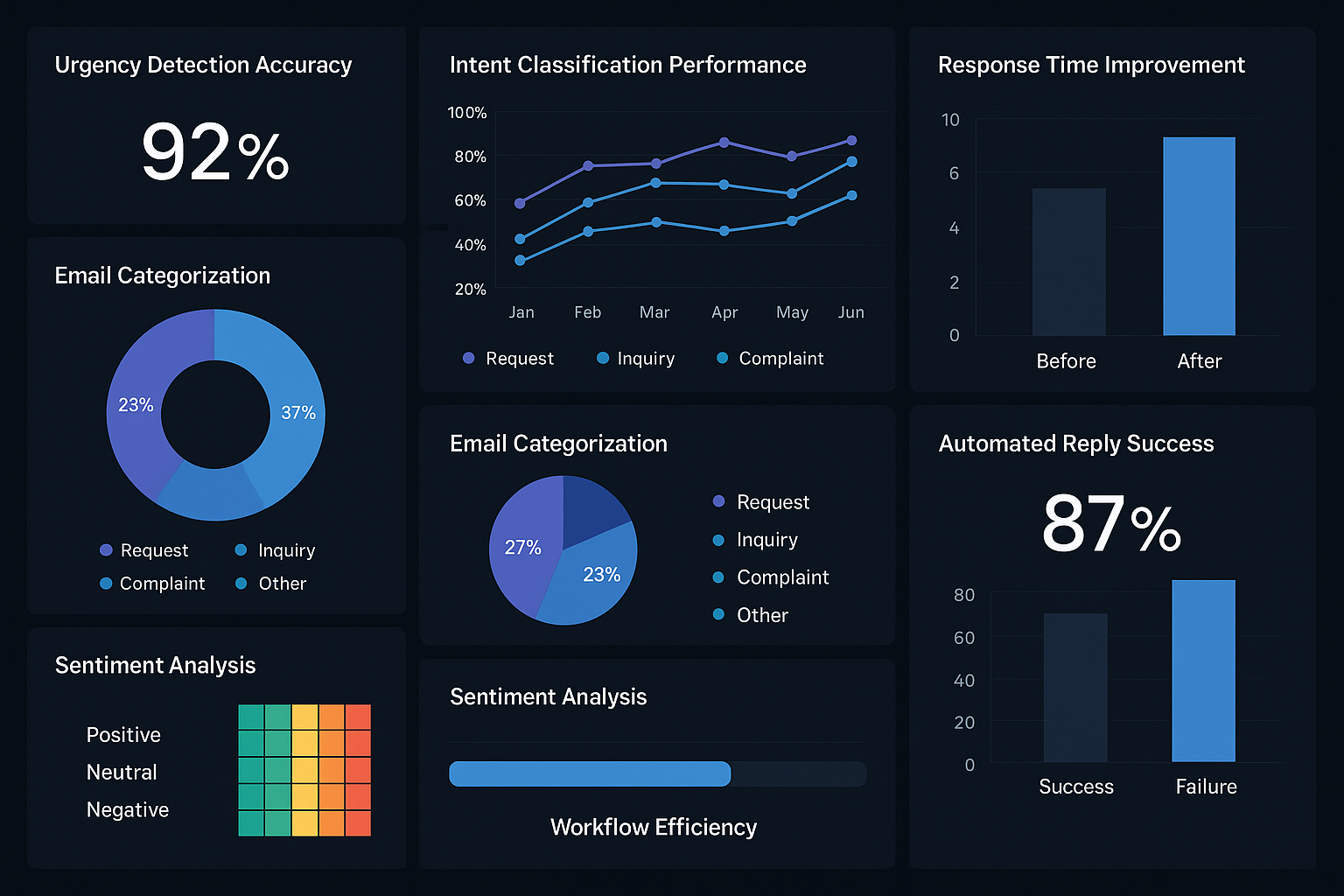
Track these essential metrics to optimize your automated email replies based on intent & urgency detection system:
📈 Response Time Metrics:
- Average time from email receipt to initial response
- Percentage of urgent emails responded to within SLA
- Reduction in customer wait times compared to manual processing
🎯 Accuracy Measurements:
- Intent classification accuracy rate (target: >90%)
- Urgency detection precision and recall
- False positive/negative rates for automated routing
😊 Customer Satisfaction:
- Response to automated email quality ratings
- Customer escalation rates after automated responses
- Net Promoter Score (NPS) impact from improved responsiveness
Continuous Learning and Optimization
Machine Learning Feedback Loops:
- Human agent corrections feed back into AI models to improve future classifications
- Customer response patterns help refine urgency detection algorithms
- A/B testing of response templates optimizes engagement rates
Regular Model Updates:
- Monthly review of classification accuracy
- Quarterly retraining with new email data
- Annual assessment of workflow effectiveness
Advanced n8n Configuration Tips
Prompt Engineering for Better Results
System Prompts for Consistent Brand Voice:
You are a helpful customer service AI for [Company Name].
Respond professionally but warmly, focusing on solving customer problems quickly.
Always include next steps and contact information for human support when needed.
Use industry-specific terminology appropriately but avoid technical jargon unless the customer demonstrates expertise.
Error Handling and Fallbacks
Robust Workflow Design:
- Confidence thresholds: Only automate responses when AI confidence exceeds 85%
- Human escalation triggers: Route ambiguous cases to human agents automatically
- Fallback responses: Provide helpful general responses when intent detection fails
- Monitoring alerts: Notify administrators of unusual patterns or system errors
Integration Best Practices
Data Flow Optimization:
- Standardize data formats between different tools and AI models
- Implement retry logic for API calls to external services
- Cache frequently used responses to improve performance
- Log all decisions for audit trails and troubleshooting
Future Trends and Innovations
Emerging Technologies
🤖 Multi-Agent AI Systems: n8n’s new AI Agent tools make it easier to deploy specialized AI agents for different aspects of email processing – one for intent detection, another for response generation, and a third for quality control.
🔗 Enhanced Integration Capabilities: Future developments will include deeper integrations with CRM systems, allowing for more sophisticated customer journey mapping and personalized response generation.
📱 Mobile-First Optimization: As mobile email usage continues to grow, automated responses will be optimized for mobile reading and interaction patterns.
Regulatory Considerations
Privacy and Compliance:
- GDPR compliance for European customer data processing
- CCPA requirements for California residents
- Industry-specific regulations (HIPAA for healthcare, SOX for financial services)
- Transparent AI disclosure when customers interact with automated systems
Conclusion
Automated email replies based on intent & urgency detection represents a transformative approach to customer communication that combines the power of artificial intelligence with practical workflow automation. By implementing these systems through n8n, businesses can achieve unprecedented levels of responsiveness while maintaining the personal touch that customers expect.
The key to success lies in starting with a focused use case, measuring results carefully, and continuously refining your workflows based on real-world performance data. Whether you’re managing customer support, sales inquiries, or content marketing responses, the combination of intent detection, urgency assessment, and intelligent automation can dramatically improve both efficiency and customer satisfaction.
Next Steps for Implementation
🚀 Immediate Actions:
- Audit your current email volume and identify the most time-consuming message types
- Set up a basic n8n instance and explore the AI workflow templates
- Choose one specific use case (like support ticket triage) for your first implementation
- Gather sample emails to train and test your intent classification models
📊 Medium-term Goals:
- Implement comprehensive tracking and analytics
- Expand to multiple email channels and message types
- Integrate with your existing CRM and support tools
- Train team members on monitoring and optimizing AI workflows
🎯 Long-term Vision:
- Develop custom AI models trained on your specific business domain
- Create predictive customer journey automation
- Implement advanced personalization based on customer behavior patterns
- Build a fully integrated customer communication ecosystem
The future of business communication is intelligent, responsive, and automated. By embracing automated email replies based on intent & urgency detection today, organizations position themselves at the forefront of customer service innovation while building the foundation for even more sophisticated AI-driven workflows tomorrow.
References
[1] AI-integrated email systems research, Customer Service Technology Report 2025
[2] Sentiment analysis in customer communication, Journal of Business Automation 2025
[3] Context awareness algorithms study, Natural Language Processing Quarterly 2025
[4] Semantic intent clustering analysis, Machine Learning Applications Review 2025
[5] Predictive email optimization research, Digital Marketing Analytics 2025
[6] High-urgency routing systems study, Business Process Management 2025
[7] Google Smart Reply system performance data, AI Communication Systems 2025
[8] Trigger-based automation effectiveness, Marketing Automation Research 2025